How to Add Notenz to Your Home Screen (iOS and Android)
July 2, 2026
Notenz works as a full app directly from your browser - no App Store download needed. Add it to your home screen once and it opens like any other app.
How to install on iPhone (iOS)
Open notenz.com in Safari. Then follow these steps:
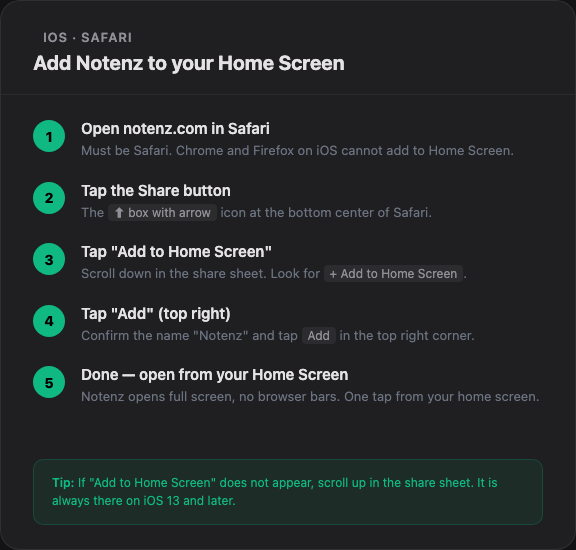
Step-by-step: adding Notenz to your iPhone home screen
- Open notenz.com in Safari (must be Safari, not Chrome, on iOS)
- Tap the Share button (the box with arrow pointing up) at the bottom
- Scroll down and tap "Add to Home Screen"
- Tap "Add" in the top right corner
- Notenz appears on your home screen like a native app
How to install on Android
Open notenz.com in Chrome. Then:
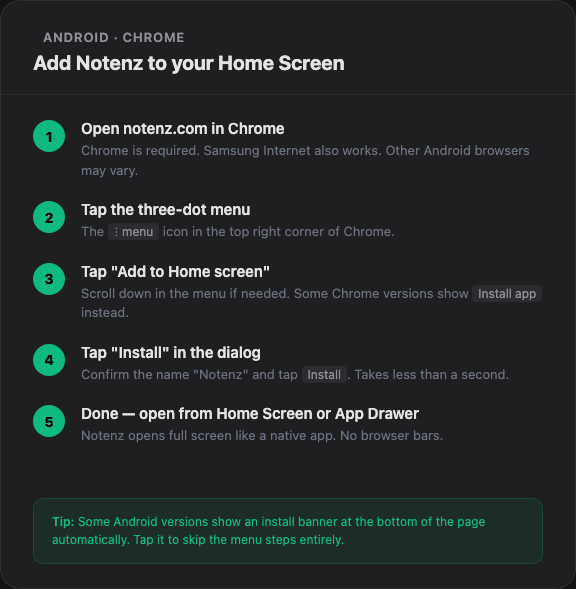
Step-by-step: adding Notenz to your Android home screen
- Open notenz.com in Chrome
- Tap the three-dot menu (top right)
- Tap "Add to Home screen"
- Tap "Install" in the dialog
- Notenz appears on your home screen and in your app drawer
Why install it?
- Opens instantly from your home screen, no browser navigation
- Full-screen with no address bars
- Easier to check in regularly (one tap away)
- Push notifications work when installed (Pro and Guardian)
- No App Store account or download required
Troubleshooting
iOS: "Add to Home Screen" not showing? Make sure you are using Safari. Apple only allows home screen installation from Safari on iOS.
Android: No "Add to Home screen" option? Make sure you are using Chrome.