Check-In Apps vs Dead Man's Switch: What's the Difference?
June 17, 2026
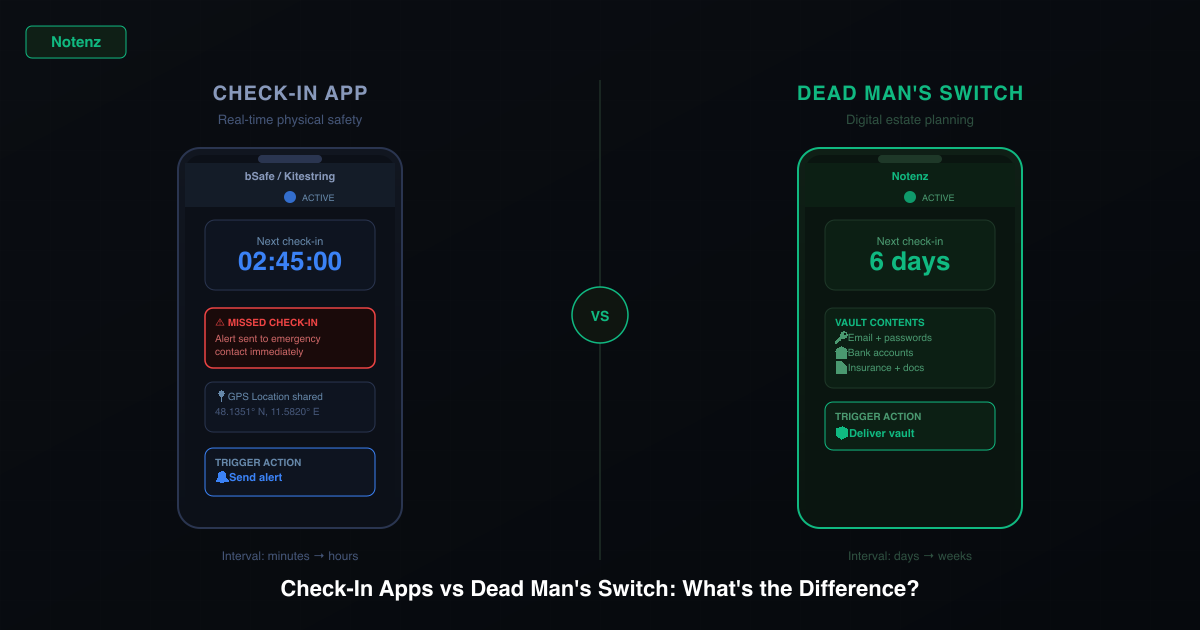
Both terms get used in similar contexts: apps that check whether you're okay and do something if you're not. But they work differently, solve different problems, and are suited to different situations. If you're trying to choose between them, or trying to understand what you actually need, here's a clear breakdown.
What a check-in app does
A check-in app asks you to confirm you're okay at regular intervals. Miss a check-in, and it alerts someone: a friend, a family member, an emergency contact. The core use case is personal safety: solo hikers, people who travel alone, anyone in a situation where someone should know if they go quiet.
Most check-in apps are designed around short intervals (hours, not weeks) and real-time alerts. You set a timer, check in when prompted, and if you miss it, your contact gets a notification. Some apps also share your GPS location so your contact knows where to look.
Check-in apps are good at: confirming you got home safely, tracking solo travel, triggering emergency alerts for physical safety situations.
What a dead man's switch does
A dead man's switch also monitors whether you check in. But the trigger interval is longer (typically days or weeks) and what happens when you don't is fundamentally different: instead of sending an alert, it delivers something, such as information, documents, messages, or account access.
The name comes from industrial safety: a switch that a machine operator holds down continuously, and that cuts power if the operator lets go. Applied to digital life, a dead man's switch is an automated delivery mechanism. You store what your family or trusted contacts would need (passwords, documents, a final letter), and the switch delivers it automatically if you stop checking in.
Dead man's switches are good at: digital estate planning, password inheritance, making sure important documents reach the right people, automated delivery of final messages.
The key differences
| Feature | Check-in app | Dead man's switch |
|---|---|---|
| Check-in interval | Minutes to hours | Days to weeks |
| What triggers action | Missed check-in | Missed check-in |
| What the action is | Alert / notification | Delivery of content |
| Content stored | None (or location) | Passwords, documents, messages |
| Primary use case | Physical safety | Digital estate planning |
| Who it's for | Solo travelers, remote workers | Anyone with accounts and dependents |
When you need a check-in app
You're going hiking alone in an area with poor signal. You're traveling solo in a country where you don't speak the language. You have a medical condition that means someone should check on you regularly. You work alone in a physical environment where an accident is possible.
In these situations, the goal is real-time awareness. Someone needs to know quickly if you've stopped responding. GPS location matters. The check-in window is short. Apps like bSafe, Kitestring, or Life360 are built for this.
When you need a dead man's switch
You have passwords, financial accounts, or digital assets that no one else can access. You want your family to receive important documents or messages if something happens to you. You want to make sure your crypto wallet, investment accounts, or insurance details reach the right people automatically.
The goal here isn't real-time safety. It's long-term planning. The check-in window is weekly or monthly. What matters is the content of the vault, not location data. Services like Notenz are built for this.
Can you use both?
Yes, and many people do. A solo traveler might use a check-in app during the trip (short intervals, location sharing, emergency alerts) and a dead man's switch service for long-term estate planning (weekly check-ins, encrypted vault, automatic delivery).
They solve adjacent problems. The check-in app answers "is this person okay right now?" The dead man's switch answers "if this person is gone, what happens to everything they leave behind?"
A note on services that blur the line
Some services try to do both: short check-in intervals with content delivery on trigger. This can work for specific use cases, but there's a practical tension: a weekly check-in cadence is reasonable for estate planning but too slow for solo travel safety. A 15-minute check-in cadence makes sense for hiking but would generate constant false alarms in daily life.
The better approach is usually a dedicated tool for each problem. Use a real-time check-in app when physical safety is the concern. Use a dead man's switch service when digital estate planning is the goal.
Notenz is a dead man's switch for your digital life. Store passwords, accounts, and important documents in an encrypted vault. Check in weekly. If you ever go quiet, your people get access automatically.
See how Notenz worksRelated Articles
-
Why we retired the free plan
Jul 23, 2026
-
How to Add Notenz to Your Home Screen (iOS and Android)
Jul 2, 2026
-
Digital Legacy Planning: A Practical Guide for Financial Advisors
Jun 28, 2026