Notenz vs Facebook Legacy Contact: Memorializing a Profile vs Handing Over Access
June 17, 2026
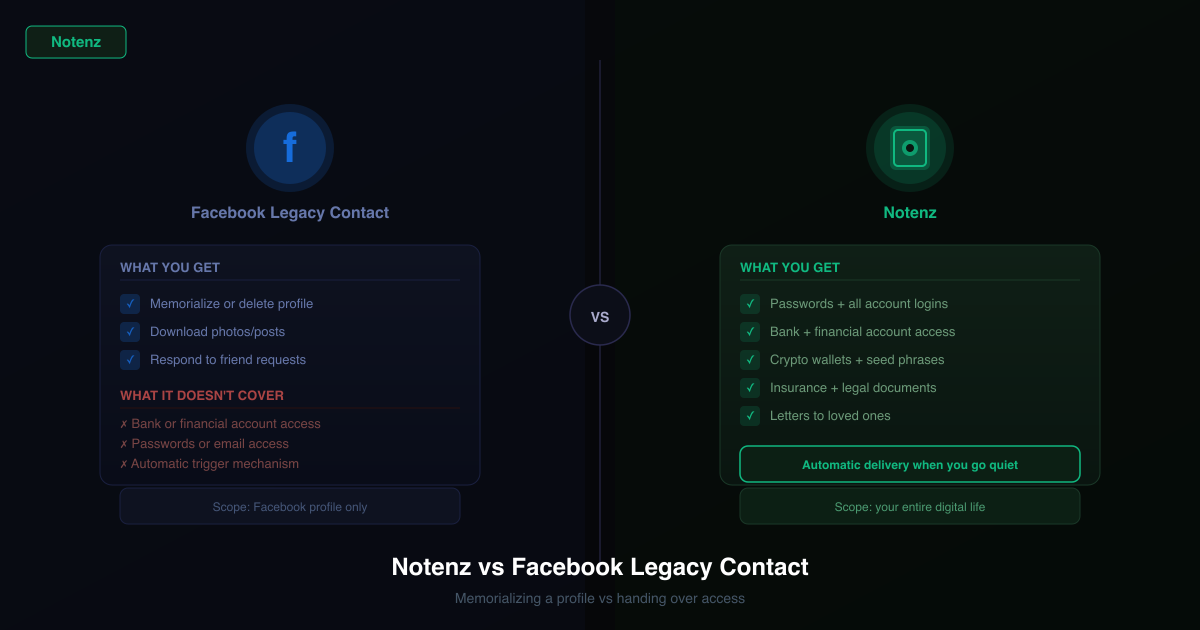
Facebook (and Instagram, under the same Meta policies) lets you set a legacy contact and choose what happens to your account if you're no longer around to manage it. It's a thoughtful feature for a real problem, deciding what happens to years of photos, posts, and messages. It's also a feature about your profile, not your accounts, and the difference matters.
How Facebook's legacy contact and memorialization work
In your settings, under Memorialization, you can choose a legacy contact and decide whether your account should be memorialized or permanently deleted once Facebook is notified you're no longer around. A memorialized account gets "Remembering" added above your name, stays visible to friends, and your legacy contact can pin a tribute post, respond to new friend requests, and update your profile and cover photo, depending on your region's settings. What they can't do is log in as you.
What it does well
- It's free and built into a platform most people already use
- It gives friends and family a respectful, predictable outcome for the profile itself
- You can choose deletion instead of memorialization if that's your preference
Where it falls short
Your legacy contact never gets your login. They can manage the public-facing profile, but they can't read your messages, access linked payment methods, or use the account the way you did.
Someone has to report it to Facebook first. Memorialization doesn't trigger on its own. A family member or friend has to submit a request, which means it depends on someone knowing this feature exists and acting on it.
It only covers Facebook and Instagram. Your email, banking, crypto wallet, password manager, and the dozens of other accounts that make up your digital life are all completely outside its scope. And there's no mechanism here for passing on instructions, final wishes, or anything written for the people you leave behind.
How Notenz fits around it
Facebook's memorialization settings and Notenz aren't solving the same problem, and they don't overlap:
- Automated detection. Notenz check-ins notice when something's wrong on a schedule you set, no one has to remember to report anything to a platform
- Actual access, not just a memorialized profile. If you want your family to be able to log in and download your photos or messages, that login goes in your encrypted vault
- Everything outside social media. Banking, crypto, insurance, and every other account you hold
- Written instructions and final wishes. Including what you'd like to happen to your social accounts, memorialize, delete, or leave as-is
The honest recommendation
Set a legacy contact on Facebook and Instagram, it's free and takes a couple of minutes, and it gives friends and family a clear outcome for your public profile. But it's a small piece of a much bigger picture. Use Notenz for the rest: the automated check-in, the actual account access, and the written instructions that tell people what you'd want done.
Social accounts are usually a small part of the picture. For email, banking, passwords, and the rest, see our digital estate planning checklist, or check how exposed your accounts already are with the free Lockout Risk Calculator.
Related Articles
-
Why we retired the free plan
Jul 23, 2026
-
How to Add Notenz to Your Home Screen (iOS and Android)
Jul 2, 2026
-
Digital Legacy Planning: A Practical Guide for Financial Advisors
Jun 28, 2026