What Happens to Your 2FA Backup Codes When You're Gone?
June 21, 2026
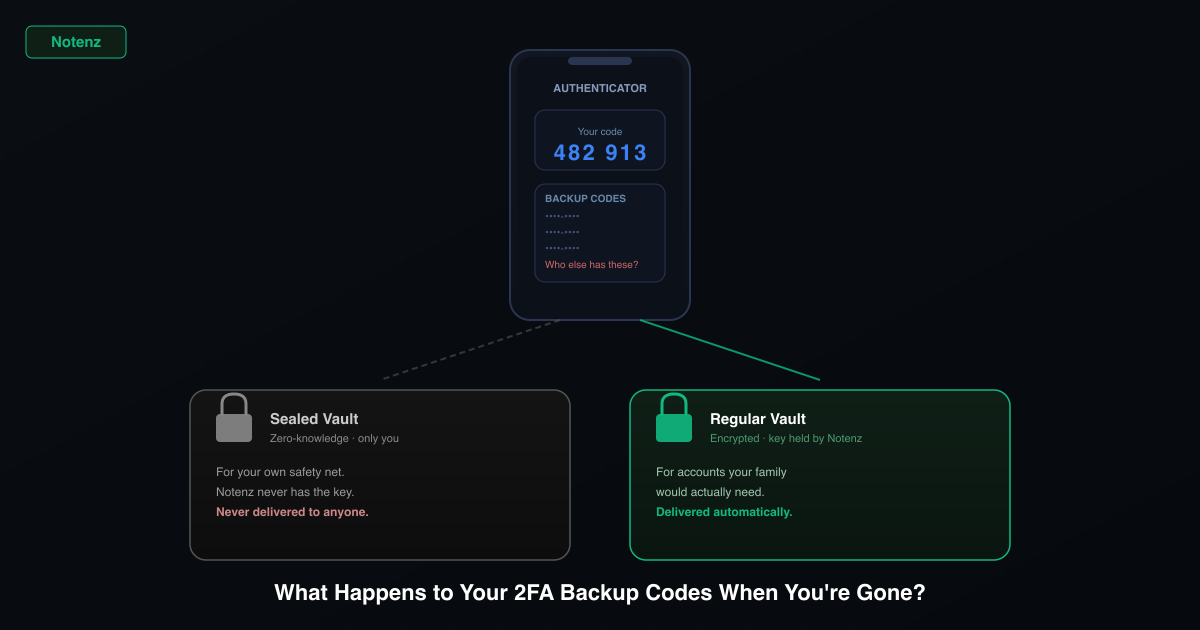
Two-factor authentication is one of the best things you can do for your account security. It also creates a quiet problem almost nobody plans for: if you're ever not around to approve a login, those same codes can lock out exactly the people who need access.
Why backup codes exist in the first place
When you turn on two-factor authentication for email, banking, or a password manager, the service usually hands you a set of one-time backup codes. They're meant for one situation: you lose your phone or your authenticator app stops working, and you still need to get back in. Most people generate them once, glance at the list, and forget they exist.
The safety net usually only works for you
A password alone isn't enough to get into a 2FA-protected account. Whoever needs in also needs the second factor, and if you're the one who set it up, you're usually the only person who knows where that is. That's fine while you're around to hand it over. It's a real problem the moment you're not.
- Printed on paper. Gets filed away and forgotten, or it's sitting in a drawer in a home nobody else can get into yet.
- Screenshotted on your phone. Protected by the same lock screen that's now part of the problem.
- Saved inside your password manager. Which itself needs a second factor to open. A circular lock.
- Not saved anywhere. "I'll just use my phone" works right up until your phone isn't available.
Two different problems, two different fixes
It's worth separating these, because they need different tools.
Locking yourself out is the original problem 2FA backup codes solve. For this, you want the codes stored somewhere durable and encrypted that only you can open, full stop, with nobody else able to read it, ever. That's what a zero-knowledge vault is for.
Leaving your family locked out is a different problem with a different requirement: someone you trust needs to be able to get in if you're ever not around to do it yourself. A zero-knowledge vault is the wrong tool here by design, since the entire point is that nobody but you can ever open it. What you actually need is account access stored somewhere that automatically reaches the right person when it needs to.
How to actually plan for it
- When you enable 2FA on an account, save the backup codes somewhere durable immediately. Not "later."
- Never store backup codes only on the one device they're protecting you from losing.
- Decide which accounts your family would actually need (email, banking, password manager) and which are just yours to keep.
- Put the first kind somewhere that reaches a trusted person automatically if you're ever not around. Keep the second kind somewhere only you can ever open.
How Notenz handles both cases
Notenz's Guardian plan includes a Sealed Vault, a zero-knowledge section with a ready-made "2FA & Recovery Codes" template. It's encrypted with a key Notenz never has, which means it's genuinely private, and also means it's never delivered to anyone, including your recipients. Use it for your own personal safety net, the codes that are nobody's business but yours.
For the accounts your family would actually need, store those as a regular Notenz vault item instead. Regular vault items are encrypted, but Notenz holds the key needed to deliver them, and that's the point: if you stop checking in, your chosen recipients get automatic access. Same encryption discipline, opposite delivery behavior, matched to what each kind of code is actually for.
Notenz is a dead man's switch for your digital life. Store passwords, 2FA backup codes, and account access in an encrypted vault. Check in periodically. If you ever go quiet, the right people get access automatically.
See how Notenz worksRelated Articles
-
Why we retired the free plan
Jul 23, 2026
-
How to Add Notenz to Your Home Screen (iOS and Android)
Jul 2, 2026
-
Digital Legacy Planning: A Practical Guide for Financial Advisors
Jun 28, 2026